
Evaluating Tool-Using Agents in Production-Oriented Environments with OpenEnv
OpenEnv is an open-source framework from Meta and Hugging Face for creating standardized, isolated, and reusable environments for training and deploying AI agents, especially for Reinforcement Learning (RL) and agentic workflows.

Turing Research Council
13 min read
February 11, 2026
What is OpenEnv - A Comprehensive Overview
Introduction to OpenEnv
OpenEnv is an open-source framework from Meta and Hugging Face for creating standardized, isolated, and reusable environments for training and deploying AI agents, especially for Reinforcement Learning (RL) and agentic workflows. It offers a unified Gymnasium-style API, containerized execution (Docker), and a central hub on Hugging Face for sharing these environments. Unlike traditional frameworks that focus primarily on games and simulated environments, OpenEnv bridges the gap between research and production by providing a standardized interface for building, deploying, and evaluating AI agents across diverse domains.
As large language models increasingly act as tool-using agents (issuing API calls, manipulating external systems, and executing multi-step workflows, etc.), the quality of the environments they interact with becomes critical. These environments define what agents can observe, what actions they can take, and how reliably their behavior can be trained and evaluated.
Evolution from Classical RL Frameworks
From OpenAI Gym to OpenEnv
The original OpenAI Gym (now Gymnasium) established the foundational pattern for RL environments:
- Observation Space: What the agent sees
- Action Space: What the agent can do
- Step Function: Execute action, return observation, reward, done
- Reset Function: Initialize new episode
While revolutionary for its time, OpenAI Gym was primarily designed for:
- Simulated game environments (Atari, CartPole, MuJoCo)
- Discrete/continuous control problems
- Single-machine training loops
- Stateless HTTP interactions
OpenEnv’s Modern Architecture
OpenEnv introduces several paradigm shifts. This example contrasts traditional stateless HTTP-based environment interactions with OpenEnv’s persistent WebSocket sessions, where environment state is maintained across multiple agent actions.
1. WebSocket-Based Persistent Sessions
# OLD: Stateless HTTP (OpenAI Gym style)
response = requests.post("/step", json={"action": action})
observation = response.json()["observation"]

# NEW: Persistent WebSocket connections (OpenEnv)
with EnvClient(base_url="ws://localhost:8004") as client:
    result = client.reset()  # Initialize session
    for _ in range(100):
        result = client.step(action)  # Maintain state
    # Session state preserved across interactions
Benefits:
- Lower latency: No connection overhead per request
- Stateful interactions: Server maintains context across steps
- Better for agents: Multi-turn dialogues, complex workflows
- Session isolation: Each client gets dedicated environment instance
2. Production-First Design
OpenEnv environments are containerized microservices with:
- Docker + FastAPI: Each environment is a deployable service
- Health checks: /health endpoint for monitoring
- API documentation: Auto-generated Swagger/OpenAPI docs at /docs
- Horizontal scaling: Multiple environment instances behind load balancer
- CLI tooling: openenv build, openenv validate, openenv push
3. Pydantic-Based Type Safety
This example illustrates how OpenEnv uses Pydantic models to enforce structured, validated agent actions, reducing runtime errors and improving tool reliability:
# OLD: Dataclasses with manual validation
@dataclass
class Action:
    command: str
    params: dict

# NEW: Pydantic models with automatic validation
class Action(BaseModel):
    command: str = Field(..., description="Command to execute")
    params: Dict[str, Any] = Field(
        default_factory=dict,
        description="Command parameters"
    )

    @validator('command')
    def validate_command(cls, v):
        allowed = ['create', 'update', 'delete']
        if v not in allowed:
            raise ValueError(f"Command must be one of {allowed}")
        return v
Benefits:
- Runtime validation: Catch errors before execution
- Auto-generated schemas: For API documentation and client generation
- Better IDE support: Autocomplete, type hints, refactoring
4. Factory Pattern for Concurrency
This example demonstrates how OpenEnv creates a new, isolated environment instance for each client session, enabling safe concurrency and multi-tenant usage:
# OLD: Shared environment instance (race conditions!)
env = MyEnvironment()
app = create_fastapi_app(env, Action, Observation)

# NEW: Factory creates isolated instances per session
def create_environment():
    return MyEnvironment(config=load_config())

app = create_app(
    create_environment,  # Factory function
    Action,
    Observation,
    env_name="my_env"
)
# Each WebSocket connection gets its own environment!
Benefits:
- Concurrency safety: No shared state between clients
- Multi-tenancy: Different users, different configurations
- Resource isolation: Memory leaks don’t affect other sessions
OpenEnv’s Domain Coverage
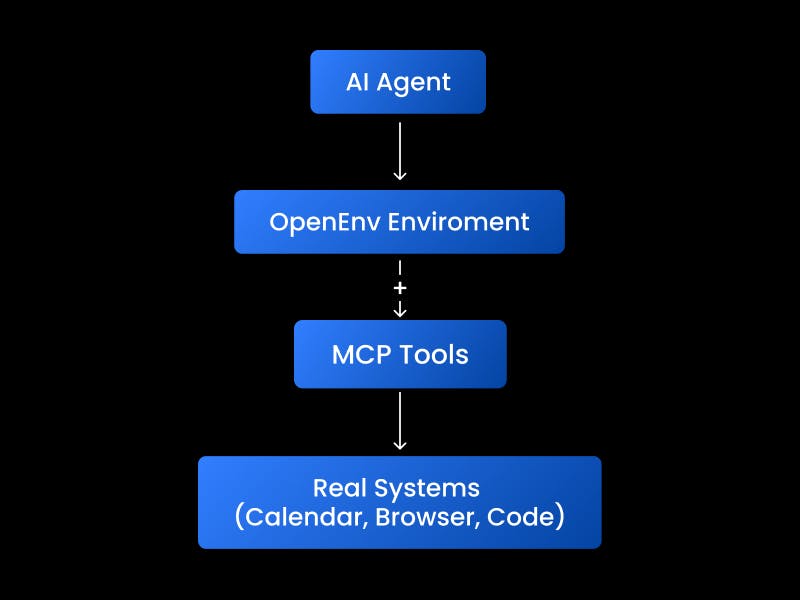
OpenEnv supports environments across diverse application domains:
1. Browser Automation (BrowserGym)
Use Case: Web navigation, form filling, UI testing, data extraction
Example Environment:
class BrowserAction(Action):
    action_type: Literal["click", "type", "navigate", "scroll"]
    selector: Optional[str] = Field(None, description="CSS selector")
    text: Optional[str] = Field(None, description="Text to type")
    url: Optional[str] = Field(None, description="URL to navigate to")

class BrowserObservation(Observation):
    html: str = Field(..., description="Current page HTML")
    screenshot: Optional[str] = Field(None, description="Base64 screenshot")
    url: str = Field(..., description="Current URL")
    success: bool = Field(..., description="Action succeeded")
Real-World Applications:
- Automated testing agents
- Web scraping with complex interactions
- Accessibility testing
- UI regression detection
2. Calendar Management (Turing’s Contribution)
Use Case: Meeting scheduling, ACL management, multi-calendar coordination, permission gating, multi-user state tracking
Example Environment:
class CalendarAction(Action):
    action_type: Literal["ListToolsAction", "ToolCallAction"]
    tool_name: Optional[str] = Field(None, description="MCP tool name")
    arguments: Dict[str, Any] = Field(default_factory=dict)

class CalendarObservation(Observation):
    success: bool
    tools_list: Optional[List[Dict[str, Any]]] = None
    tool_result: Optional[Any] = None
    error_message: Optional[str] = None
Real-World Applications:
- AI scheduling assistants
- Cross-organization meeting coordination
- Calendar analytics and optimization
- ACL policy enforcement
3. Code Development (Coding Env)
Use Case: Software development agents, bug fixing, code review
Example Environment:
class CodeAction(Action):
    action_type: Literal["read_file", "write_file", "run_tests", "git_commit"]
    file_path: Optional[str] = None
    content: Optional[str] = None
    commit_message: Optional[str] = None

class CodeObservation(Observation):
    file_content: Optional[str] = None
    test_results: Optional[Dict[str, Any]] = None
    git_status: Optional[str] = None
    success: bool
Real-World Applications:
- Automated code repair (like Turing’s SWE-bench work)
- Code review automation
- Documentation generation
- Refactoring assistants
4. Gaming Environments (OpenSpiel, Atari, Snake)
Use Case: Game-playing agents, multi-agent competition
Benefits over Traditional Gym:
- Network play: Multiple agents via WebSocket
- Tournament infrastructure: Built-in matchmaking
- Spectator mode: Real-time observation without playing
- Replay buffers: Stored in production database
5. Financial Trading (FinRL)
Use Case: Algorithmic trading, portfolio optimization
Production Features:
- Market data integration: Real-time and historical feeds
- Risk management: Position limits, stop-loss enforcement
- Paper trading: Validate strategies before live deployment
- Compliance: Audit trails, regulatory reporting
6. Text-Based Games (TextArena)
Use Case: NLP agents, interactive fiction, conversational AI
Example:
- Wordle solver agents
- Story generation and gameplay
- Multi-agent negotiation games
Core Concepts and Architecture
Step-State-Reset Paradigm
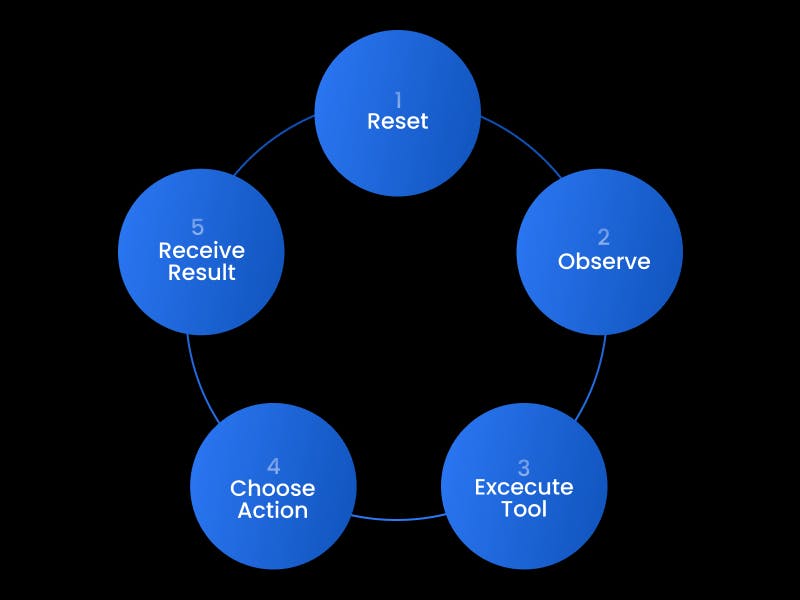
OpenEnv maintains the classic RL loop but enhances it:
class Environment(ABC):
    """Abstract base for all OpenEnv environments."""

    @abstractmethod
    def reset(self) -> Observation:
        """Initialize new episode, return initial observation."""
        pass

    @abstractmethod
    def step(self, action: Action) -> Observation:
        """Execute action, return observation (with reward/done)."""
        pass

    @property
    @abstractmethod
    def state(self) -> State:
        """Return current environment state (episode_id, step_count)."""
        pass
Key Enhancements:
- Stateful Sessions: State persists across API calls via WebSocket
- Typed Interfaces: Action/Observation are Pydantic models
- Middleware Support: Logging, metrics, authentication, rate limiting
- Async Support: Native async/await for I/O-bound operations
Model Context Protocol (MCP) Integration
OpenEnv environments can expose MCP tools for agent interaction. This example shows how an agent discovers available MCP tools and invokes a specific tool as part of a multi-step workflow:
# Calendar Gym exposes 25+ MCP tools
tools = [
    "calendars_list",          # List user's calendars
    "calendars_get",           # Get calendar details
    "events_list",             # List events
    "events_insert",           # Create event
    "events_update",           # Update event
    "acl_list",                # List access control rules
    "acl_insert",              # Add calendar permission
    # ... 18 more tools
]
MCP Benefits:
- Standardized tool calling: JSON-RPC 2.0 protocol
- Discoverability: Agents can query available tools
- Composability: Tools can call other tools
- Error handling: Structured error responses
Example Tool Call:
# Agent discovers tools
result = client.step(Action(action_type="ListToolsAction"))
print(result.observation.tools_list)  # All 25 calendar tools

# Agent calls specific tool
result = client.step(Action(
    action_type="ToolCallAction",
    tool_name="events_insert",
    arguments={
        "calendarId": "primary",
        "summary": "Team Standup",
        "start": {"dateTime": "2026-01-10T09:00:00Z"},
        "end": {"dateTime": "2026-01-10T09:30:00Z"}
    }
))
WebSocket Communication Protocol
OpenEnv uses WebSocket for client-server communication. This example illustrates the JSON message structure exchanged between an agent and an OpenEnv environment during a single interaction step:
Connection Flow:
1. Client connects: ws://localhost:8004/ws
2. Server creates isolated environment instance
3. Client sends: {"action": "reset"}
4. Server responds: {"observation": {...}, "reward": 0, "done": false}
5. Client sends: {"action": {"type": "tool_call", "tool": "..."}}
6. Server responds: {"observation": {...}, "reward": 1, "done": false}
7. ... (multiple steps)
8. Client disconnects: Environment instance cleaned up
Message Format (JSON):
// Request
{
  "action": {
    "action_type": "ToolCallAction",
    "tool_name": "calendars_list",
    "arguments": {}
  }
}

// Response
{
  "observation": {
    "success": true,
    "tool_result": [...],
    "error_message": null
  },
  "reward": 1.0,
  "done": false,
  "state": {
    "episode_id": "abc-123",
    "step_count": 5
  }
}
Advantages over HTTP:
- Bi-directional: Server can push updates to client
- Lower overhead: No HTTP headers per message
- Connection pooling: Better resource utilization
- Real-time: Sub-millisecond latency
Deployment and Operations
Containerized Environments
Each OpenEnv environment is a self-contained Docker container:
# Multi-stage build for efficiency
FROM python:3.11-slim AS builder
WORKDIR /app
COPY pyproject.toml uv.lock ./
RUN pip install uv && uv sync --frozen

FROM python:3.11-slim
COPY --from=builder /app/.venv /app/.venv
COPY . /app
ENV PATH="/app/.venv/bin:$PATH"
HEALTHCHECK CMD curl -f http://localhost:8000/health
CMD ["uvicorn", "server.app:app", "--host", "0.0.0.0"]
Benefits:
- Reproducibility: Same environment everywhere (dev, staging, prod)
- Isolation: Dependencies don’t conflict
- Scalability: Deploy multiple replicas easily
- Portability: Run on any container orchestration platform
CLI Tooling
OpenEnv provides a CLI for environment lifecycle:
# Initialize new environment from template
openenv init my_new_env --output-dir ./envs

# Build Docker image
openenv build

# Validate environment follows standards
openenv validate --verbose

# Push to Hugging Face Hub
openenv push --org my-org --token $HF_TOKEN

# Deploy to Kubernetes
openenv deploy --replicas 3 --namespace production
Monitoring and Observability
Production environments include:
- Health checks: /health endpoint (liveness, readiness)
- Metrics: Prometheus-compatible /metrics
- Logging: Structured JSON logs with trace IDs
- OpenTelemetry: Distributed tracing support
Example Metrics:
# Automatically collected
openenv_steps_total{env="calendar", status="success"} 1523
openenv_step_duration_seconds{env="calendar", quantile="0.95"} 0.23
openenv_active_sessions{env="calendar"} 47
openenv_errors_total{env="calendar", type="validation"} 12
Comparison Summary
Why OpenEnv is Important and What It Achieves
Bridging Research and Production
OpenEnv solves the “RL deployment gap” where:
- Research: Algorithms work great in simulation
- Production: Deploying agents to real systems is difficult
What OpenEnv achieves:
- Standardized Interface: Any RL algorithm can interface with any OpenEnv environment through a consistent API, enabling algorithm research to directly benefit production applications.
- Real-World Integration: Environments connect to actual systems (browsers, calendars, code repositories, financial markets), not just simulations.
- Evaluation at Scale: Benchmark agents across diverse tasks (BrowserGym, SWE-bench, calendar management) with consistent metrics.
- Agent Interoperability: Build agents once, deploy to any OpenEnv-compatible environment (similar to how Docker containers run anywhere).
- Ecosystem Growth: Community can contribute to environments, and everyone benefits from shared infrastructure (CLI, validation, deployment).
Impact Areas:
- Enterprise Automation: Replace brittle RPA scripts with adaptive agents
- Developer Productivity: Code-writing agents (Turing’s SWE-bench expertise)
- Scheduling Optimization: Multi-agent calendar coordination
- Financial Services: Trading agents in regulated environments
- Quality Assurance: Autonomous testing across web/mobile/desktop
To demonstrate how OpenEnv operates in practice and to contribute meaningful benchmarks to the ecosystem, Turing developed the Calendar Gym: a production-grade environment that captures the complexity of real-world scheduling, permissions, and multi-agent coordination. The following section details why calendars were chosen, how the environment was designed, and what it reveals about the strengths and limitations of today’s tool-using agents.
Turing’s Technical Contribution: The Calendar Gym
Why We Chose the Calendar Environment
Turing selected calendar management as our flagship OpenEnv contribution for several strategic reasons:
1. Real-World Complexity
Calendar systems exhibit challenging properties perfect for RL research:
Multi-Agent Coordination
- Scheduling conflicts: Multiple agents trying to book the same time slot
- Hierarchical permissions: ACLs define who can modify calendars
- Cross-organization: Calendars span organizational boundaries
State Space Complexity
- Combinatorial explosion: With 4 users and 11 calendars, billions of possible ACL configurations
- Temporal constraints: Events have start/end times, recurrence rules, time zones
- Relational data: Events link to calendars, calendars to users, ACLs to both
Partial Observability
- Agents don’t see other users’ private calendars
- Some events may be “busy” markers without details
- ACL rules determine what information is visible
2. Alignment with Turing’s Expertise
Turing has pioneered tool-using agents through SWE-bench, where agents:
- Navigate code repositories
- Execute shell commands
- Run tests and interpret results
- Make multi-step code edits
Calendar Gym extends this expertise:
- 25+ MCP tools for calendar operations (similar to shell/git commands)
- Multi-step workflows: List calendars → Check ACLs → Modify permissions → Verify changes
- Error recovery: Handle API errors, retry failed operations
- Constraint satisfaction: Ensure ACL policies are met
3. Measurable Outcomes
Calendar tasks provide objective verification:
# Example verifier: "Alice should have writer access to Bob's project calendar"
verifier = {
    "verifier_type": "database_state",
    "validation_config": {
        "query": """
            SELECT COUNT(*) FROM acls
            WHERE calendar_id='bob-projects'
            AND user_id='alice_manager'
            AND role IN ('writer', 'owner')
        """,
        "expected_value": 1,
        "comparison_type": "equals"
    }
}
This enables:
- Automated evaluation: No human judgment needed
- Reproducible benchmarks: Same database state every run
- Fine-grained metrics: Success rate per tool, per scenario, per difficulty level
Architecture of the Calendar Gym
Key Technical Innovations
1. Multi-Tenancy with Database Isolation
Each agent session gets its own isolated database. This example demonstrates how each Calendar Gym session is assigned its own isolated database instance, ensuring reproducibility and preventing cross-session interference:
class MCPEnvironment(Environment):
    def __init__(self, database_id: str, auth_token: Optional[str] = None):
        self.database_id = database_id
        self.session_manager = get_session_manager()
        # Each database_id → separate SQLite file
        self.db_engine = self.session_manager.get_engine(database_id)
Why this matters:
- Parallel benchmarking: Run 100 agents simultaneously, each with isolated state
- Reproducibility: Reset database to initial state between runs
- Security: No cross-contamination between sessions
2. Dual Protocol Support: OpenEnv + MCP
The Calendar Gym implements two protocols. This example highlights how the Calendar Gym supports both the OpenEnv interaction protocol and the MCP tool-calling protocol, enabling compatibility with a wide range of agent frameworks:
# OpenEnv protocol (step/reset)
@app.post("/step")
async def step(action: MCPAction) -> Dict[str, Any]:
    observation = env.step(action)
    return {
        "observation": observation.model_dump(),
        "reward": calculate_reward(observation),
        "done": is_task_complete(observation)
    }

# MCP protocol (JSON-RPC 2.0)
@app.post("/mcp")
async def mcp_endpoint(request: Request) -> Dict[str, Any]:
    body = await request.json()
    if body["method"] == "tools/list":
        return {"result": {"tools": list_all_tools()}}
    elif body["method"] == "tools/call":
        tool_name = body["params"]["name"]
        result = execute_tool(tool_name, body["params"]["arguments"])
        return {"result": result}
Benefits:
- Agent compatibility: Works with any MCP-compatible agent framework
- Tool discovery: Agents can query available operations
- Standardization: Follows established JSON-RPC conventions
3. Header-Based Authentication and Context
Multi-user scenarios require per-request authentication:
@app.post("/step")
async def step(
    request: Request,
    action: MCPAction
) -> Dict[str, Any]:
    # Extract headers
    access_token = request.headers.get("x-access-token")
    database_id = request.headers.get("x-database-id")

    # Set context for this request
    env.set_request_context(
        database_id=database_id,
        access_token=access_token
    )

    # Execute action with proper permissions
    observation = env.step(action)
    return {"observation": observation.model_dump()}
4. Comprehensive Tool Suite (25+ Operations)
The Calendar Gym exposes the full Google Calendar API v3 via MCP tools:
How to Use the Calendar Gym
Installation
# Clone repository
git clone https://github.com/your-org/rl-gym.git
cd rl-gym/calendar

# Install dependencies (using uv for speed)
pip install uv
uv sync

# Or traditional pip
pip install -r requirements.txt
Running Locally
# Start server
uvicorn main:app --reload --port 8004

# Test health check
curl http://localhost:8004/health

# View API docs
open http://localhost:8004/docs
Running with Docker
# Build and run
docker compose build --no-cache calendar
docker compose up -d calendar

# Check logs
docker logs calendar-service -f

# Test
curl http://localhost:8010/health
Basic Agent Interaction
from openenv_wrapper.client import MCPEnvClient
from openenv_wrapper.data_models import MCPAction

# Connect to environment
with MCPEnvClient(base_url="http://localhost:8004") as client:
    # Reset environment (initializes database with sample data)
    result = client.reset()
    print(f"Reset successful: {result.observation.success}")

    # Discover available tools
    result = client.step(MCPAction(action_type="ListToolsAction"))
    print(f"Available tools: {len(result.observation.tools_list)}")

    # List Alice's calendars
    result = client.step(MCPAction(
        action_type="ToolCallAction",
        tool_name="calendars_list",
        arguments={}
    ))
    calendars = result.observation.tool_result["items"]
    print(f"Alice has {len(calendars)} calendars")

    # Create a new event
    result = client.step(MCPAction(
        action_type="ToolCallAction",
        tool_name="events_insert",
        arguments={
            "calendarId": "primary",
            "summary": "AI Research Sync",
            "start": {"dateTime": "2026-01-15T14:00:00Z"},
            "end": {"dateTime": "2026-01-15T15:00:00Z"}
        }
    ))
    print(f"Event created: {result.observation.success}")
Defining Reward Functions
The Calendar Gym supports flexible reward shaping for RL training. This example shows how rewards are computed based on agent success, efficiency, and tool usage to guide learning and evaluation:
Built-in Reward Components
def calculate_reward(observation: MCPObservation) -> float:
    """Calculate reward based on observation."""
    reward = 0.0

    # Success/failure
    if observation.success:
        reward += 1.0
    else:
        reward -= 0.5

    # Efficiency (fewer steps = better)
    if observation.step_count < 5:
        reward += 0.2

    # Tool usage (prefer specific tools over generic)
    if observation.tool_used in ["acl_patch", "events_update"]:
        reward += 0.1  # Prefer targeted modifications
    elif observation.tool_used in ["acl_insert", "events_insert"]:
        reward -= 0.1  # Penalize creating new entities unnecessarily

    return reward
Custom Reward Functions
For research, you can define domain-specific rewards:
# Example: Reward minimal ACL changes
def minimal_acl_changes_reward(observation: MCPObservation, initial_state: Dict) -> float:
    if observation.tool_used.startswith("acl_"):
        # Count ACL modifications
        current_acls = query_acl_count()
        initial_acls = initial_state["acl_count"]

        # Penalize creating new ACLs
        if current_acls > initial_acls:
            return -0.5

        # Reward modifying existing ACLs
        return 0.5
    return 0.0
Verifiers: Automated Success Criteria
Verifiers are SQL-based checks that validate agent behavior:
Verifier Structure
{
    "verifier_type": "database_state",
    "name": "Alice_Has_Writer_Access",
    "description": "Alice must have writer or owner role on Bob's project calendar",
    "validation_config": {
        "query": """
            SELECT COUNT(*) AS count
            FROM acls
            WHERE calendar_id='bob-projects'
              AND user_id='alice_manager'
              AND role IN ('writer', 'owner')
        """,
        "expected_value": 1,
        "comparison_type": "equals"
    }
}
Documentation Links
- Quick Start: README.md
- Migration Guide: calendar/MIGRATION.md
- API Reference: http://localhost:8004/docs (when running)
- Database Schema: models
- Tool Implementations: calendar/handlers/calendar_tools.py
- Example Benchmarks: tests
Insights Gained from RL Gyms
Although the following insights are derived from rigorous benchmarking within the Calendar Gym, they reflect broader challenges inherent to real-world, tool-using agents: the failure modes and performance bottlenecks observed here extend beyond scheduling tasks, offering actionable lessons for the design, prompting, and evaluation of agentic systems operating in complex production environments.
Key Findings from Calendar Gym Benchmarks
Through extensive evaluation on the Calendar Gym, we’ve identified several critical insights about tool-using agents:
1. Multi-Step Reasoning is the Bottleneck
Observation: Agents excel at single-tool calls but struggle with multi-step workflows.
Why this matters:
- Real-world tasks require chaining multiple API calls
- Agents must maintain context across steps
- Error recovery becomes critical in long workflows
2. Ambiguity Resolution is Underrated
Observation: Agents often fail when identifiers are ambiguous (e.g., “Bob’s calendar” vs. “bob-development” vs. “bob-personal”).
Benchmark Result:
Scenario: "Grant Alice access to Bob's project calendar"
- With explicit ID: 89% success
- With natural language description: 41% success
Agent Failure Modes:
- Guessing: Uses first match without validation
- Over-querying: Looks up same entity multiple times
- Hallucination: Invents non-existent calendar IDs
Lesson: Agents need explicit lookup → validate → use patterns.
3. Tool Selection is Not Enough
Observation: Even when agents select the correct tool, they often provide malformed arguments.
Error Breakdown (from 500 failed tool calls):
- Wrong tool selected: 23%
- Correct tool, wrong arguments: 51%
- Correct tool & arguments, wrong order: 18%
- Other (timeout, auth): 8%
Common Argument Errors:
- Missing required fields (e.g., calendarId omitted)
- Type mismatches (string vs. object)
- Invalid enum values (e.g., role="admin" instead of "owner")
Lesson: Argument validation and example-driven prompting are essential.
Related resources



Ready to Strengthen Your Model?
Partner with Turing to fine-tune, validate, and deploy models that learn continuously.